The call you can't afford to miss
0→1 AI assistant / Designing trust into AI delegation for small businesses
Company: CallRail
Year: 2025
Role: Product Designer
Small businesses lose customers between calls. After hours, during overflow, when no one picks up, callers just move on. That's lost revenue. Worse, it's a first impression that never got the chance to happen.
Voice Assist is an AI assistant that handles calls on behalf of small businesses. Getting it to work was not the only hard part. Getting owners to trust it enough to turn it on was.

0 to 1: Design thinking
There was no product to iterate on yet, and no usage data. Just an assumption: small businesses would only trust an AI assistant to answer their phones if it didn't sound like a generic bot.
We talked to owners across trades before building anything. That validated the assumption, but it also revealed more. They were worried about it saying something a real customer wouldn't expect, or setting the wrong expectations for their business.
So we mapped two flows before designing any screens: how an owner would set the AI up, and how a caller would actually experience it. Every setup decision got checked against that second flow: what a real call would sound like.

Building it
The core design challenge was representation. If an AI was going to answer calls for a business, it could not sound generic. A law firm and a home services company are not the same.
We built personalization into the foundation. Users could select a voice and tone for the AI, and write a custom greeting it would deliver when answering the phone.
Users could also define the questions the AI would ask callers. We provided common standard questions drawn from user interviews as a starting point. For teams with more specific needs, custom questions gave them the flexibility to go further.
To reduce manual setup, we pulled information directly from their website to generate an initial business profile so the AI could accurately answer callers’ questions.
The MVP launched in July 2025. Early results validated the core premise. Missed calls dropped 44% in Property Management, and answered calls increased 118% in Home Services. The AI was working.
But activation was stalling.
What the data showed
Trial accounts were exploring. Sessions were long. But 43% never completed setup, and activation rates still weren't moving.
The instinct was to simplify the configuration flow. But when we looked at behavior, users weren't getting lost. They were stopping deliberately -- completing part of setup, then leaving without activating.
They hadn't heard the AI speak for their business yet, so they didn't know what to configure or whether it was worth the risk.
The barrier wasn't complexity. It was confidence.
The reframe
We'd been designing for configuration, assuming that if we pointed users to setup, they would activate.
But the real question users were asking wasn't "how do I set this up?" It was "what if it says the wrong thing to a real customer?" That's a different problem.
The design problem shifted from discoverability to delegation. The solution wasn't simplifying setup. It was building confidence first.
iterate
The redesign started with one question: what does a user need to feel confident enough to activate?
Not everything. Just enough: a website URL as the single entry point, letting the user kick off an auto-generated business profile in the background while they move forward.
From there, we offered two best-performing voice options, a best-practice greeting, and the most commonly used intake questions. Full customization was intentionally deferred until after this guided setup, so users were not overwhelmed by choices.
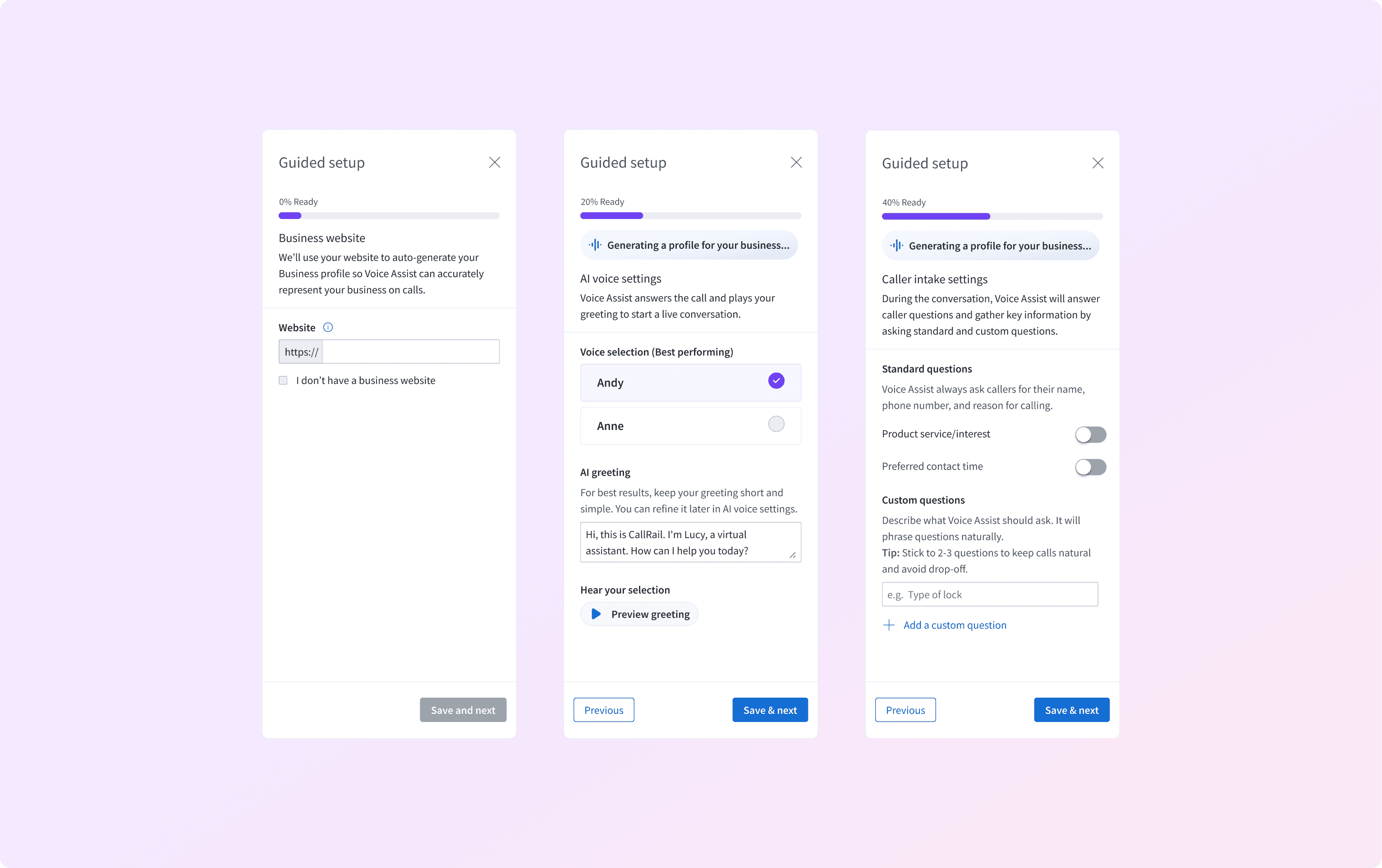
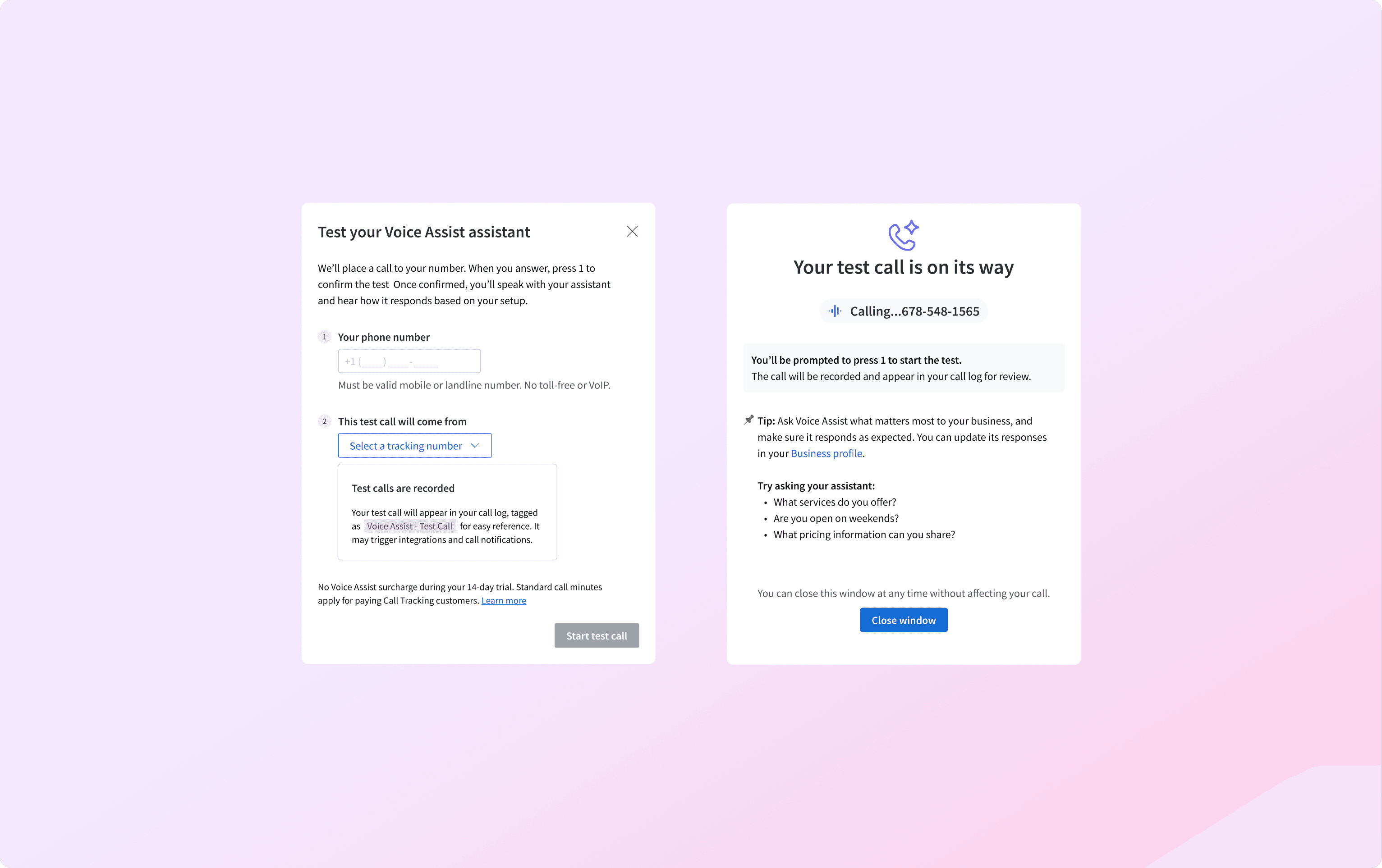
Guided setup leads to a test call. The moment where configuration became something you could actually hear. Where "did I set this up right?" turned into "that sounds like my business."
what changed
In the first two weeks after launch:
291
trials in first 2 weeks
44%
drop in missed calls
—
Property Management
118%
increase in answered calls — Home Services
The redesign addressed what came next: turning capability into confidence. The guided side panel, the single URL entry point, and the required test call were not simplifications. They reflected that the barrier to activation is not always feature complexity, but delegation anxiety.
The thing I carried forward: trust in AI is not given. It is built through exploration, testing, and iteration, much like design thinking.
Small businesses lose customers between calls. After hours, during overflow, when no one picks up, callers just move on. That's lost revenue. Worse, it's a first impression that never got the chance to happen.
Voice Assist is an AI assistant that handles calls on behalf of small businesses. Getting it to work was not the only hard part. Getting owners to trust it enough to turn it on was.
0 to 1: Design thinking
There was no product to iterate on yet, and no usage data. Just an assumption: small businesses would only trust an AI assistant to answer their phones if it didn't sound like a generic bot.
We talked to owners across trades before building anything. That validated the assumption, but it also revealed more. They were worried about it saying something a real customer wouldn't expect, or setting the wrong expectations for their business.
So we mapped two flows before designing any screens: how an owner would set the AI up, and how a caller would actually experience it. Every setup decision got checked against that second flow: what a real call would sound like.
Building it
The core design challenge was representation. If an AI was going to answer calls for a business, it could not sound generic. A law firm and a home services company are not the same.
We built personalization into the foundation. Users could select a voice and tone for the AI, and write a custom greeting it would deliver when answering the phone.
Users could also define the questions the AI would ask callers. We provided common standard questions drawn from user interviews as a starting point. For teams with more specific needs, custom questions gave them the flexibility to go further.
To reduce manual setup, we pulled information directly from their website to generate an initial business profile so the AI could accurately answer callers’ questions.
The MVP launched in July 2025. Early results validated the core premise. Missed calls dropped 44% in Property Management, and answered calls increased 118% in Home Services. The AI was working.
But activation was stalling.
What the data showed
Trial accounts were exploring. Sessions were long. But 43% never completed setup, and activation rates still weren't moving.
The instinct was to simplify the configuration flow. But when we looked at behavior, users weren't getting lost. They were stopping deliberately -- completing part of setup, then leaving without activating.
They hadn't heard the AI speak for their business yet, so they didn't know what to configure or whether it was worth the risk.
The barrier wasn't complexity. It was confidence.
The reframe
We'd been designing for configuration, assuming that if we pointed users to setup, they would activate.
But the real question users were asking wasn't "how do I set this up?" It was "what if it says the wrong thing to a real customer?" That's a different problem.
The design problem shifted from discoverability to delegation. The solution wasn't simplifying setup. It was building confidence first.
iterate
The redesign started with one question: what does a user need to feel confident enough to activate?
Not everything. Just enough: a website URL as the single entry point, letting the user kick off an auto-generated business profile in the background while they move forward.
From there, we offered two best-performing voice options, a best-practice greeting, and the most commonly used intake questions. Full customization was intentionally deferred until after this guided setup, so users were not overwhelmed by choices.
Guided setup leads to a test call. The moment where configuration became something you could actually hear. Where "did I set this up right?" turned into "that sounds like my business."
what changed
In the first two weeks after launch:
291
trials in first 2 weeks
44%
drop in missed calls — Property Management
118%
increase in answered calls — Home Services
The redesign addressed what came next: turning capability into confidence. The guided side panel, the single URL entry point, and the required test call were not simplifications. They reflected that the barrier to activation is not always feature complexity, but delegation anxiety.
The thing I carried forward: trust in AI is not given. It is built through exploration, testing, and iteration, much like design thinking.
Small businesses lose customers between calls. After hours, during overflow, when no one picks up, callers just move on. That's lost revenue. Worse, it's a first impression that never got the chance to happen.
Voice Assist is an AI assistant that handles calls on behalf of small businesses. Getting it to work was not the only hard part. Getting owners to trust it enough to turn it on was.
0 to 1: Design thinking
There was no product to iterate on yet, and no usage data. Just an assumption: small businesses would only trust an AI assistant to answer their phones if it didn't sound like a generic bot.
We talked to owners across trades before building anything. That validated the assumption, but it also revealed more. They were worried about it saying something a real customer wouldn't expect, or setting the wrong expectations for their business.
So we mapped two flows before designing any screens: how an owner would set the AI up, and how a caller would actually experience it. Every setup decision got checked against that second flow: what a real call would sound like.
Building it
The core design challenge was representation. If an AI was going to answer calls for a business, it could not sound generic. A law firm and a home services company are not the same.
We built personalization into the foundation. Users could select a voice and tone for the AI, and write a custom greeting it would deliver when answering the phone.
Users could also define the questions the AI would ask callers. We provided common standard questions drawn from user interviews as a starting point. For teams with more specific needs, custom questions gave them the flexibility to go further.
To reduce manual setup, we pulled information directly from their website to generate an initial business profile so the AI could accurately answer callers’ questions.
The MVP launched in July 2025. Early results validated the core premise. Missed calls dropped 44% in Property Management, and answered calls increased 118% in Home Services. The AI was working.
But activation was stalling.
What the data showed
Trial accounts were exploring. Sessions were long. But 43% never completed setup, and activation rates still weren't moving.
The instinct was to simplify the configuration flow. But when we looked at behavior, users weren't getting lost. They were stopping deliberately -- completing part of setup, then leaving without activating.
They hadn't heard the AI speak for their business yet, so they didn't know what to configure or whether it was worth the risk.
The barrier wasn't complexity. It was confidence.
The reframe
We'd been designing for configuration, assuming that if we pointed users to setup, they would activate.
But the real question users were asking wasn't "how do I set this up?" It was "what if it says the wrong thing to a real customer?" That's a different problem.
The design problem shifted from discoverability to delegation. The solution wasn't simplifying setup. It was building confidence first.
iterate
The redesign started with one question: what does a user need to feel confident enough to activate?
Not everything. Just enough: a website URL as the single entry point, letting the user kick off an auto-generated business profile in the background while they move forward.
From there, we offered two best-performing voice options, a best-practice greeting, and the most commonly used intake questions. Full customization was intentionally deferred until after this guided setup, so users were not overwhelmed by choices.
Guided setup leads to a test call. The moment where configuration became something you could actually hear. Where "did I set this up right?" turned into "that sounds like my business."
what changed
In the first two weeks after launch:
291
trials in first 2 weeks
44%
drop in missed calls
—
Property Management
118%
increase in answered calls — Home Services
The redesign addressed what came next: turning capability into confidence. The guided side panel, the single URL entry point, and the required test call were not simplifications. They reflected that the barrier to activation is not always feature complexity, but delegation anxiety.
The thing I carried forward: trust in AI is not given. It is built through exploration, testing, and iteration, much like design thinking.